
Good nano banana prompts are not keyword soup. They are clear, natural-language scene descriptions: who or what is in the frame, what is happening, where it happens, how the shot is framed, and what style or lighting you want. If you have been pasting Midjourney-style strings like “cinematic, 8k, masterpiece, ultra detailed,” you will get weaker results from Nano Banana than if you write like a creative brief.
In 2026, the best nano banana prompt approach follows what Google Cloud and the Gemini community keep repeating: describe the scene in sentences, start with a strong verb, and be specific about Keep vs Change when you edit. This guide gives you 50 best nano banana prompts you can copy, swap the [brackets], and run in Movby’s Nano Banana workspace—or in Gemini—without rewriting from scratch.
Why Nano Banana prompts changed in 2026
Nano Banana (including Nano Banana 2 and Nano Banana Pro) is built to understand narrative instructions. It reasons over your request before generating. That means:
- Prefer natural language over keyword lists (“cinematic, 8k, masterpiece…”).
- Use this formula (Google Cloud / community consensus):
[Strong verb] + [Subject] + [Action] + [Location] + [Composition] + [Style/Lighting] - For edits, always state Keep (what must stay) and Change (what must move).
- For text in images, put exact copy in English double quotes and name weight, font style, and position.
- When you upload references, say what each image is for: subject / style / product / environment.
- Describe what you want (“empty plaza at dawn”) instead of what you don’t (“no people, without cars”).
How to use these 50 prompts
- Pick a category that matches your job (figurine, edit, product, poster, etc.).
- Copy the full prompt into a code block—don’t trim the Keep/Change lines.
- Replace every
[placeholder]using the Swap line under it. - If you need a reference photo, upload it first in image-to-image, then paste the prompt.
- For pure text ideas, start in text-to-image.
Quick model picker
| Goal | Model tip |
|---|---|
| Fast iteration, social drafts, viral toys | Nano Banana 2 / Flash-class |
| Exact text, posters, labels, infographics | Nano Banana Pro |
| Figurine / identity edits from a photo | Any Nano Banana + upload the photo |
| Real-time weather / search-grounded concepts | Nano Banana 2 (when search grounding is available) |
How to use these prompts
Step 1 — Choose a category. Viral figurines, photo edits, portraits, e-commerce, typography, UI/storyboards, or cinematic direction.
Step 2 — Copy the full prompt. Each entry below is a complete instruction, not a title.
Step 3 — Swap [placeholders]. Then generate. For multi-image workflows, upload references before pasting.
Viral 3D Figurine & Toys (#1–#8)
These nano banana 3d figurine prompt templates are inspired by the viral Gemini desk-figurine trend. Upload a clear photo of your subject first.
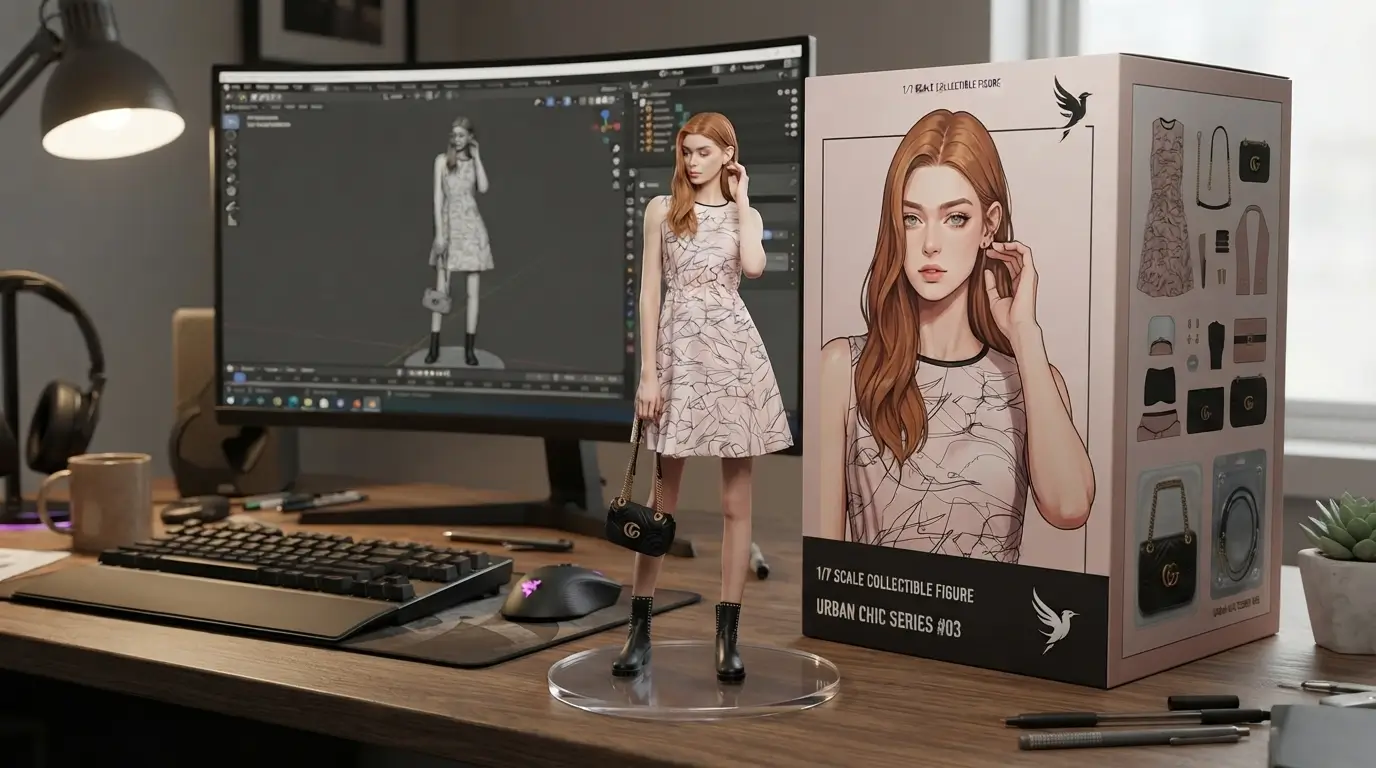
#1 — Viral desk figurine (original-style, inspired by viral Gemini trend)
Best for: Social virality, creator merch previews
Model tip: Nano Banana / Nano Banana 2 + photo upload
Create a 1/7 scale commercialized figurine of the characters in the picture, in a realistic style, in a real environment. The figurine is placed on a computer desk. The figurine has a round transparent acrylic base, with no text on the base. The content on the computer screen is a 3D modeling process of this figurine. Next to the computer screen is a toy packaging box, designed in a style reminiscent of high-quality collectible figures, printed with original artwork. The packaging features two-dimensional flat illustrations.
Swap: Upload your subject photo as the character reference; keep the prompt otherwise intact for the classic viral look.
#2 — Artisan workshop figurine
Best for: Craft / indie brand storytelling
Model tip: Nano Banana 2 + photo
Create a 1/7 scale realistic commercial figurine of the person in the reference photo. Place the figurine on a worn wooden workbench in a warm artisan workshop. Keep the face and outfit recognizable. The figurine stands on a round clear acrylic base. Behind it, a laptop shows a 3D sculpting viewport of the same figure. Beside the laptop, include a premium collectible box with flat 2D character art matching the figurine. Soft window light, shallow depth of field, documentary product photography.
Swap: Replace “the person in the reference photo” with [Subject description] if you are not uploading a face photo.
#3 — Anime figurine variant
Best for: Anime OCs, fan art merch concepts
Model tip: Nano Banana 2
Create a 1/7 scale anime-style PVC figurine of [Character name], matching the uploaded reference for face, hair, and costume. Place it on a tidy anime collector’s desk with RGB keyboard glow. Round transparent acrylic base. A monitor shows ZBrush-like 3D modeling of this figurine. A glossy anime box sits beside the screen with flat 2D key art of the same character. Clean commercial toy photography, bright softbox lighting.
Swap: [Character name] → your OC or series character; upload the reference as subject.
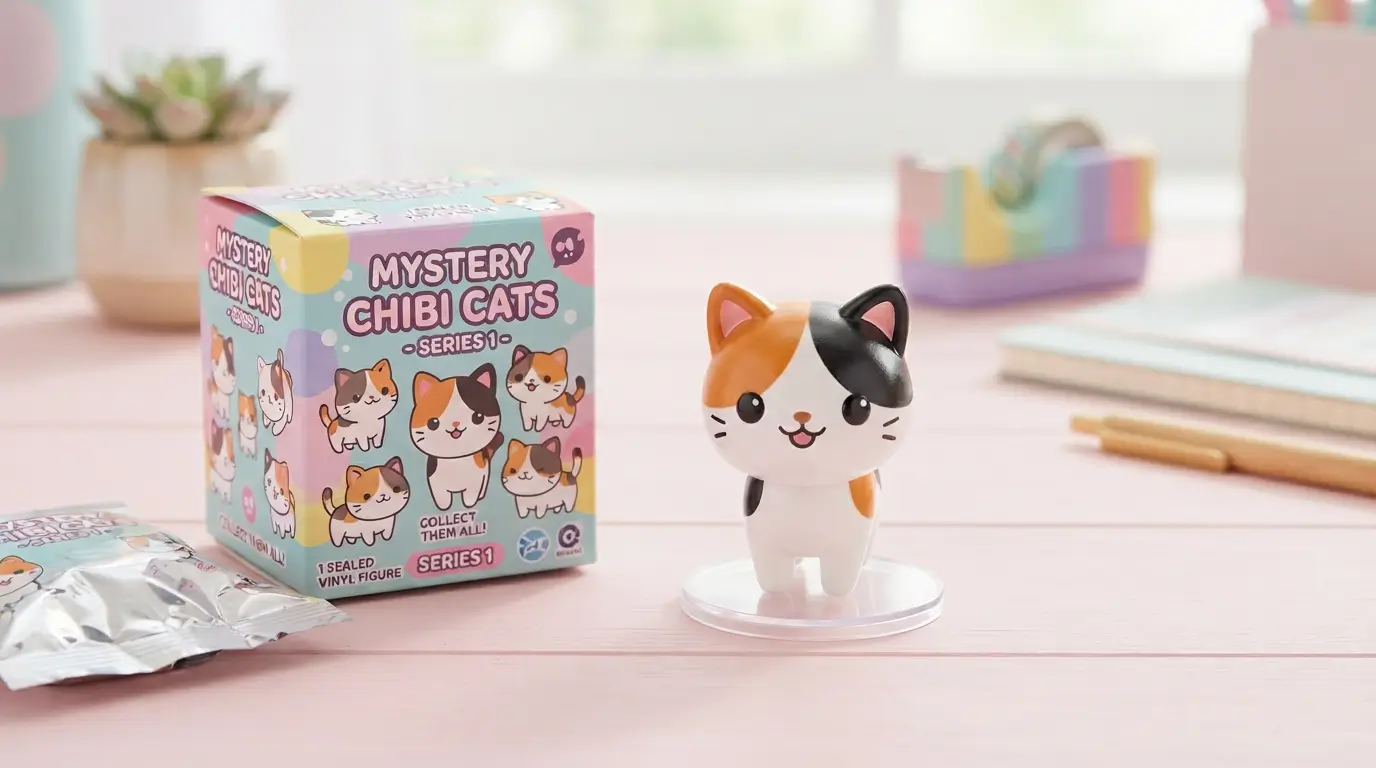
#4 — Blind-box chibi vinyl
Best for: Blind-box / Pop Mart–style concepts
Model tip: Nano Banana 2
Create a chibi vinyl blind-box figure of [Subject], exaggerated cute proportions, glossy plastic material. Show the opened blind box on a pastel desk, figure standing on a small clear disc base. Include the sealed blind-box packaging next to it with simple flat illustrations of [Subject]. Soft pastel studio lighting, toy catalog style, centered composition.
Swap: [Subject] → pet, mascot, or person nickname + upload photo if identity matters.
#5 — Plush toy version
Best for: Soft goods / gift concepts
Model tip: Nano Banana
Transform the subject in the reference photo into a huggable plush toy with visible stitched seams, soft fleece texture, and embroidered eyes. Place the plush on a cozy bedroom desk next to a sewing machine and fabric scraps. Include a retail hangtag and a window box with flat illustrations of the plush. Warm practical lamp lighting, lifestyle product photo.
Swap: Upload the subject photo; optionally add [Plush color palette] in one sentence after the first line.
#6 — Game character diorama
Best for: Game marketing, Kickstarter visuals
Model tip: Nano Banana Pro for cleaner packaging text later; Nano Banana 2 for speed
Create a detailed 1/7 scale game-character diorama of [Character] from the reference, posed mid-action on a scenic base that matches [Game environment]. Place the diorama on a streamer’s desk. A monitor shows the 3D modeling process of this diorama. Beside it, a collector’s box uses flat 2D key art. Dramatic key light from the left, cinematic toy photography.
Swap: [Character] + [Game environment] (e.g., “neon rooftop,” “mossy ruins”).
#7 — Pet figurine
Best for: Pet parents, gift content
Model tip: Nano Banana 2 + pet photo
Create a realistic 1/7 scale pet figurine of the animal in the reference photo, accurate fur markings and expression. Place it on a home office desk with a round clear acrylic base. The computer screen shows 3D sculpting of this pet figurine. A premium pet-collectible box with flat illustrations sits nearby. Soft daylight from a side window, shallow depth of field.
Swap: Upload the pet photo; add [Accessory] (tiny scarf, collar charm) if desired.
#8 — Packaging with quoted brand text (Pro)
Best for: Merch mockups that need readable branding
Model tip: Nano Banana Pro
Create a 1/7 scale commercial figurine of the subject in the reference photo on a computer desk with a round transparent acrylic base. Next to the monitor, design a high-end collector box. On the front of the box, print the brand name "NANO COLLECT" in bold condensed sans-serif at the top, and the line "LIMITED DROP" in smaller tracking-wide sans-serif under it. Keep packaging illustrations flat and two-dimensional. Photoreal desk environment, soft studio light.
Swap: "NANO COLLECT" / "LIMITED DROP" → your brand strings; keep quotes.
Try the figurine set on Movby Nano Banana with your photo uploaded first—identity holds best when the reference is sharp and well lit.
Photo Editing & Restoration (#9–#16)
Use Keep + Change every time. Upload the base photo in image-to-image.
#9 — Object removal
Best for: Clean travel / real-estate shots
Model tip: Nano Banana 2
Edit the uploaded photo. Keep the camera angle, lighting, and every person and object exactly as they are. Change only this: remove [Object to remove] and fill the area with matching background texture, perspective, and lighting so the edit is seamless.
Swap: [Object to remove] → “the trash can on the left,” “the street sign,” etc.
#10 — Object replacement
Best for: Catalog fixes, prop swaps
Model tip: Nano Banana 2
Edit the uploaded photo. Keep the composition, lighting, and all other elements unchanged. Change only this: replace [Old object] with [New object], matching scale, contact shadows, and color temperature so it looks native to the scene.
Swap: [Old object] / [New object] → e.g., “plastic cup” → “ceramic mug.”
#11 — Background change
Best for: Portrait relocation, LinkedIn B-roll
Model tip: Nano Banana / Nano Banana 2
Edit the uploaded photo. Keep the subject’s face, body, clothing, pose, and edge lighting exactly the same. Change only the background to [New background], with depth-of-field blur that matches the original lens look and realistic contact lighting on the subject.
Swap: [New background] → “soft gray studio seamless,” “sunny café interior,” etc.
#12 — Crowd removal
Best for: Landmark photos, empty streets
Model tip: Nano Banana 2
Edit the uploaded photo. Keep the architecture, sky, and camera perspective unchanged. Change the scene so the plaza looks naturally empty at the same time of day—rebuild pavement, shadows, and storefront reflections where people currently stand.
Swap: Optionally name the area: “foreground sidewalk in front of [Landmark].”
#13 — Outpaint to 16:9
Best for: YouTube covers, presentation slides
Model tip: Nano Banana Pro for cleaner edges; 2 for speed
Outpaint the uploaded image to a cinematic 16:9 frame. Keep the original subject and framing centered as the hero. Extend the environment left and right with continuous perspective, matching lighting, textures, and color grade so the new edges feel original—not stretched.
Swap: Add [Mood note] if needed (“keep golden-hour warmth”).
#14 — Lighting upgrade to studio
Best for: Portrait polish, catalog rescue
Model tip: Nano Banana 2
Edit the uploaded photo. Keep the subject’s identity, pose, wardrobe, and facial expression unchanged. Change the lighting to a clean three-point softbox studio setup with soft key light at 45 degrees, gentle fill, and a subtle rim light. Place the subject on a seamless [Backdrop color] backdrop.
Swap: [Backdrop color] → “charcoal,” “ivory,” “soft sage.”
#15 — Restore & colorize old photo
Best for: Family archives, heritage posts
Model tip: Nano Banana Pro
Restore and colorize the uploaded historical photo. Keep faces, poses, clothing shapes, and composition faithful to the original. Repair scratches, dust, and fading. Apply natural period-accurate colors, gentle film grain, and avoid modern beauty filters.
Swap: Add [Decade hint] if known (“circa 1950s outdoor family portrait”).
#16 — Colorize only (B&W)
Best for: When structure is already good
Model tip: Nano Banana 2
Colorize the uploaded black-and-white photo. Keep sharpness, grain structure, and composition unchanged. Infer realistic skin tones, clothing colors, and environment colors. Do not restyle or modernize the fashion.
Swap: Optionally lock colors: “her dress should be [Color].”
For batch photo fixes, keep one strong Keep/Change template and only swap the change clause—then run it in the Nano Banana editor.
Portraits, Headshots, Avatars (#17–#22)
#17 — LinkedIn professional headshot
Best for: Personal branding
Model tip: Nano Banana 2 + selfie upload
Create a professional LinkedIn headshot from the uploaded photo. Keep the person’s exact facial identity. Change wardrobe to a neat [Attire], soft natural window light, neutral [Backdrop] background, head-and-shoulders framing, gentle catchlights in the eyes, photoreal corporate portrait.
Swap: [Attire] / [Backdrop] → “navy blazer” / “light gray seamless.”
#18 — Founder portrait
Best for: About pages, pitch decks
Model tip: Nano Banana Pro
Generate a confident founder portrait of [Name description]. Subject stands half-turned toward camera in a modern office with blurred desks behind. Medium shot, 85mm look, soft daylight from the left, authentic skin texture, editorial startup-magazine style.
Swap: [Name description] → age range, hair, outfit; or upload a face reference and say “match the uploaded identity.”
#19 — Dramatic spotlight portrait
Best for: Artist / musician promo
Model tip: Nano Banana 2
Create a dramatic spotlight portrait of [Subject]. Single hard key light from above-left, deep shadow falloff, charcoal background, sweat or subtle sheen on skin, intense eye contact, square crop suitable for album art.
Swap: [Subject] → “a jazz vocalist in a black turtleneck,” etc.
#20 — Cyberpunk identity-preserving transform
Best for: Gaming avatars, campaign hooks
Model tip: Nano Banana 2 + photo
Transform the uploaded person into a cyberpunk night-city look. Keep facial identity clearly recognizable. Change clothing to a techwear jacket with subtle LED trim, add soft neon magenta and cyan rim light, rainy street bokeh behind, cinematic medium close-up.
Swap: Adjust palette: “prefer [Accent color] neon.”
#21 — 360° character reference sheet
Best for: OC consistency, commissions
Model tip: Nano Banana Pro
Create a character reference sheet for [Character]. Show front, 3/4, side, and back views on a clean light-gray studio background, consistent proportions and costume details across all views. Label each view with small readable sans-serif tags: "FRONT", "3/4", "SIDE", "BACK". Even softbox lighting, concept-art turnaround style.
Swap: [Character] + upload design refs as style/subject.
#22 — Same character in a new scene
Best for: Story continuity, ad variants
Model tip: Nano Banana 2 + character ref
Place the same character from the reference image into a new scene: [New scene]. Keep face, body proportions, and signature outfit details identical. Match lighting direction to the new environment. Medium-wide shot, photoreal (or match the reference art style if the reference is illustrated).
Swap: [New scene] → “boarding a night train,” “hiking a foggy ridge,” etc.
Product & E-commerce (#23–#30)
These follow Google Cloud / product-photography community style: natural language + controlled light. Great for text-to-image or product refs in image-to-image.
#23 — Studio product, three-point softbox, 45°
Best for: PDP hero shots
Model tip: Nano Banana 2
Generate a studio product photo of [Product] resting on a matte [Surface] surface. Light it with a three-point softbox setup, key light at 45 degrees, soft fill, gentle rim. 45-degree camera angle, sharp focus on the label, subtle reflection, commercial catalog style.
Swap: [Product] / [Surface] → “matte black wireless earbuds case” / “slate.”
#24 — Auto-isolate to pure white e-commerce
Best for: Marketplace listings
Model tip: Nano Banana 2 + product photo
Edit the uploaded product photo. Keep the product shape, materials, and label text exactly the same. Change the background to pure white seamless (#FFFFFF), even soft lighting, minimal shadow under the product for a clean e-commerce cutout look.
Swap: If multiple SKUs, add “keep [SKU detail] readable.”
#25 — Lifestyle scene placement
Best for: Ads, lookbooks
Model tip: Nano Banana 2
Place the product from the reference image into a lifestyle scene: [Lifestyle setting]. Keep the product’s exact design and proportions. Natural window light, lived-in props that support the brand mood, shallow depth of field, magazine lifestyle photography.
Swap: [Lifestyle setting] → “sunny kitchen island with linen napkin,” etc.
#26 — Virtual garment try-on (2 refs)
Best for: Fashion e-comm
Model tip: Nano Banana Pro
Using Image 1 as the person (subject) and Image 2 as the garment (product), dress the person in the garment. Keep the person’s face, body shape, and pose. Fit the garment realistically with natural folds and fabric weight. Neutral studio backdrop, full-body fashion e-commerce shot.
Swap: Name roles explicitly if your UI labels differ: “photo A = subject, photo B = product.”
#27 — Beauty serum bottle
Best for: Skincare brands
Model tip: Nano Banana 2
Create a high-end beauty shot of a frosted glass [Serum name] dropper bottle on a wet stone slab with soft water droplets. Soft radiant key light, cool mint and ivory palette, macro-leaning detail on the glass texture, clean luxury skincare advertising style.
Swap: [Serum name] → your product; upload bottle ref as product if you have one.
#28 — Sneaker hero
Best for: Footwear drops
Model tip: Nano Banana 2
Generate a hero product photo of [Sneaker model] resting on a raw concrete block. Three-point softbox lighting, key at 45 degrees, emphasize mesh texture and sole grip, low three-quarter angle, high-contrast streetwear catalog look.
Swap: [Sneaker model] → colorway + silhouette; upload shoe photo as product.
#29 — Chocolate / confection detail
Best for: Food DTC
Model tip: Nano Banana 2
Create an appetizing studio photo of [Chocolate product] broken to show the interior. Place pieces on matte charcoal paper with a few cocoa nibs. Soft side light for sheen, shallow depth of field, commercial food photography, rich brown tones.
Swap: [Chocolate product] → “72% dark bar with sea salt,” etc.
#30 — Beauty moisturizer + multi-font promo text (Pro, Google Cloud–style)
Best for: Promo creatives with exact copy
Model tip: Nano Banana Pro
Create a high-end, glossy commercial beauty shot of a sleek, minimalist nude-colored face moisturizer jar resting on a warm studio background. Soft, radiant lighting. Next to the product, render three lines of text with this exact styling: top line "GLOW" in a flowing elegant Brush Script; middle line "10% OFF" in a heavy blocky Impact-style font; bottom line "Your First Order" in a thin minimalist Century Gothic-style font. Keep the jar label clean and readable.
Swap: Localize by adding: Then translate the three promo lines into [Language] while keeping the same font roles and layout. Inspired by Google Cloud’s moisturizer + multi-font example.
When you need SKU-accurate labels, Pro usually wins—test the same nano banana pro prompts on Movby and keep the sharper text pass.
Text, Posters, Thumbnails, Branding (#31–#38)
Quote exact strings. Name font style and placement. Prefer Nano Banana Pro for typography-heavy work.
#31 — Typographic cut-out poster “New York” (Google Cloud–style)
Best for: City campaigns, wall art
Model tip: Nano Banana Pro
Create a typographic poster with a solid black background. Bold letters spell "New York", filling the center of the frame. The text acts as a cut-out window. A photograph of the New York skyline is visible ONLY inside the letterforms.
Swap: "New York" → "Tokyo", "Lisbon", etc., and match the skyline city.
#32 — Poster with “URBAN EXPLORER”
Best for: Apparel drops
Model tip: Nano Banana Pro
Design a vertical poster of a hiker on a foggy ridge at dawn. At the top, place the headline "URBAN EXPLORER" in bold white sans-serif. Keep margins clean, high contrast, modern outdoor-brand aesthetic, 4:5 crop.
Swap: Change headline in quotes; keep “bold white sans-serif.”
#33 — YouTube reaction thumbnail + hook
Best for: Creators
Model tip: Nano Banana Pro
Create a YouTube thumbnail. Left side: exaggerated reaction face of [Creator description] with wide eyes. Right side: [Topic visual]. Overlay short hook text "WAIT FOR IT" in thick yellow sans-serif with a thin black outline, upper third. High saturation, 16:9, readable on mobile.
Swap: "WAIT FOR IT" → your hook; [Creator description] / [Topic visual].
#34 — Minimal brand logo with quoted name
Best for: Naming explorations
Model tip: Nano Banana Pro
Design a minimal logo mark for the brand name "NORTHFOLD" as clean geometric wordmark, medium weight sans-serif, balanced letterspacing, flat vector look on an off-white background. Centered composition, no extra icons unless a tiny fold crease accent helps readability.
Swap: "NORTHFOLD" → your brand.
#35 — App icon
Best for: Startup mockups
Model tip: Nano Banana 2
Create an iOS-style app icon for [App idea]. Simple centered symbol, soft gradient background in [Colors], subtle depth, no tiny unreadable text. Squircle canvas, high clarity at small sizes.
Swap: [App idea] / [Colors] → “habit tracker” / “coral to sand.”
#36 — Bakery storefront sign
Best for: Readable-text demos, local business mockups
Model tip: Nano Banana Pro
Generate a sunlit bakery storefront. On the main wooden sign, paint "GOLDEN CRUST" in friendly bold serif. On the window in smaller lettering, add "FRESH DAILY" in clean sans-serif. Keep all text sharp and readable. Warm morning light, photoreal street photography.
Swap: Quote strings → your shop name / tagline.
#37 — Vintage travel poster “WANDER NORTH”
Best for: Tourism creatives
Model tip: Nano Banana Pro
Create a vintage travel poster of fjords and a small ferry. Large title "WANDER NORTH" in condensed vintage sans-serif across the top, small subtitle "EST. 1926" near the bottom. Flat illustrative print texture, limited color palette, generous margins.
Swap: Title/subtitle in quotes; change landscape to [Destination].
#38 — Localize / translate text in image
Best for: Multilingual campaigns
Model tip: Nano Banana Pro + base creative upload
Edit the uploaded poster. Keep layout, imagery, colors, and hierarchy identical. Translate all visible text into [Target language], preserving font roles (bold headlines stay bold; small captions stay small). Keep brand name " [Brand] " untranslated unless asked.
Swap: [Target language] / [Brand].
Typography is where nano banana 2 prompts and Pro diverge most—use Pro when the quote marks matter.
Infographics, Storyboards, UI (#39–#44)
Fact-check any labeled diagram before publishing.
#39 — Recipe-style concept infographic
Best for: Social carousels, blog headers
Model tip: Nano Banana Pro
Create a clean recipe-style infographic for "[Dish name]". Show numbered steps 1–4 with simple icons, ingredient chips, and a finished-dish hero photo at the top. White background, friendly sans-serif labels, generous spacing, modern food-blog layout.
Swap: "[Dish name]" → your recipe; verify times/ingredients yourself.
#40 — Labeled cross-section diagram
Best for: Explainers (always verify facts)
Model tip: Nano Banana Pro
Create a labeled cross-section diagram of [Object]. Show clear callout lines with short labels in readable sans-serif. Flat educational illustration style, light background, high contrast. Note: labels should be plausible; I will fact-check before publishing.
Swap: [Object] → “a pour-over coffee dripper,” “a lithium battery pack,” etc.
#41 — Whiteboard sketch → corporate flowchart
Best for: Ops / SaaS docs
Model tip: Nano Banana Pro + sketch upload
Using the uploaded whiteboard photo as structure, redraw it as a polished corporate flowchart. Keep the same boxes and arrows logic. Use neat rounded rectangles, consistent icons, and clear sans-serif labels. Light gray background, slide-ready 16:9.
Swap: Add brand accent: “use [Brand hex] for primary boxes.”
#42 — 4-panel storyboard, consistent character
Best for: Ads, short-film pitches
Model tip: Nano Banana 2
Create a 4-panel storyboard of [Story beats]. Keep the same character design across all panels. Each panel has a small caption box under it in plain sans-serif. Clean comic-previs style, even lighting, consistent proportions.
Swap: [Story beats] → four short sentences, one per panel.
#43 — Single comic panel with caption
Best for: Memes, newsletter art
Model tip: Nano Banana 2
Create one comic panel: [Scene]. Add a caption box at the bottom with the exact text "[Caption]". Bold ink outlines, flat colors, medium shot.
Swap: [Scene] / "[Caption]".
#44 — Wireframe → hi-fi mobile UI
Best for: Product design mockups
Model tip: Nano Banana Pro + wireframe upload
Using the uploaded wireframe as layout structure, generate a hi-fi mobile UI mockup for [App]. Keep section order and component hierarchy. Apply a modern design system with [Primary color], readable inter-like sans UI text, realistic iPhone frame, soft studio presentation.
Swap: [App] / [Primary color].
Creative Director / Cinematic Scenes (#45–#50)
#45 — Fashion editorial on seamless backdrop
Best for: Lookbook concepts
Model tip: Nano Banana Pro
Create a striking fashion model wearing a tailored [Garment], sleek boots, and holding a structured handbag. Pose with a confident, statuesque stance, slightly turned. Place the model on a seamless deep [Backdrop color] studio backdrop. Medium-full shot, center-framed. Fashion-magazine editorial, medium-format analog film look, pronounced grain, high saturation, cinematic lighting.
Swap: [Garment] / [Backdrop color] — formula adapted from Google Cloud’s fashion editorial example.
#46 — Napkin sketch + fabric → 3D armchair
Best for: Furniture / interior concepts (multi-ref)
Model tip: Nano Banana Pro
Using the attached napkin sketch as structure (style/structure reference) and the attached fabric sample as texture (material reference), transform this into a high-fidelity 3D armchair render. Place it in a sun-drenched minimalist living room (environment). Soft natural light, photoreal materials, interior-design catalog framing.
Swap: Upload sketch = structure, fabric = material; change room to [Environment].
#47 — Real-time weather miniature city (search grounding)
Best for: Weather / travel conceptual UI
Model tip: Nano Banana 2 when search grounding is available
Search for the current weather and date in [City]. Use that live data to set the atmosphere. Visualize a miniature city-in-a-cup concept embedded inside a realistic modern smartphone weather UI, matching the real conditions (rain, sun, fog, etc.). Crisp UI text for city name and temperature.
Swap: [City] → “San Francisco,” “Seoul,” etc. Requires a model path that supports search grounding.
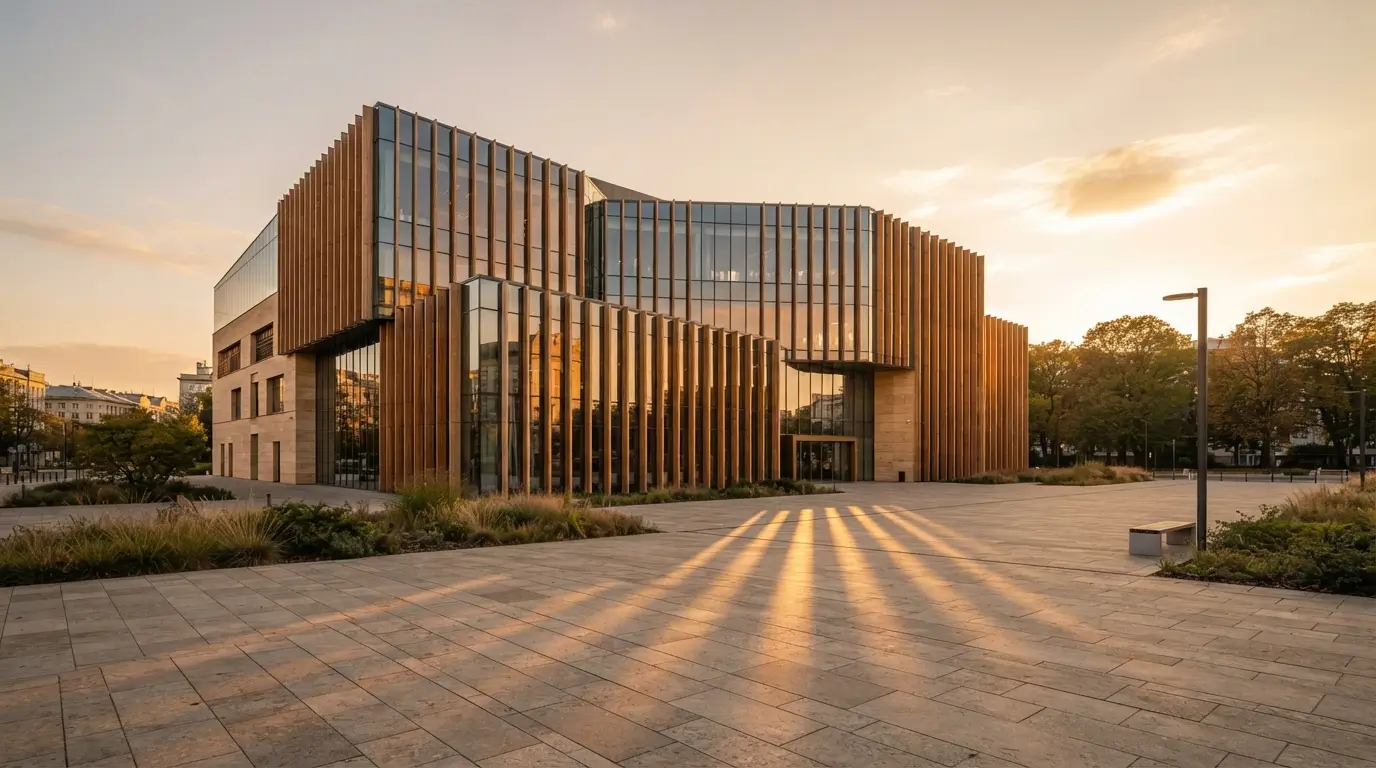
#48 — Golden hour architecture
Best for: Real-estate / travel
Model tip: Nano Banana 2
Generate a golden-hour exterior photo of [Building type] with long warm shadows, honey-colored stone or glass reflections, wide-angle but controlled distortion, people-free plaza, travel-architecture magazine style.
Swap: [Building type] → “a modern library with vertical fins,” etc.
#49 — Macro product detail
Best for: Texture-led ads
Model tip: Nano Banana Pro
Create an extreme macro detail of [Product detail], showing material weave/metal machining/skin of glaze. Side light raking across the surface, razor-thin depth of field, commercial macro photography.
Swap: [Product detail] → “leather watch strap stitching,” “matte ceramic glaze,” etc.
#50 — Teal-grade night street + quoted neon
Best for: Music / nightlife creatives
Model tip: Nano Banana Pro
Create a cinematic night street scene with muted teal color grading, wet asphalt reflections, and shallow depth of field. In the mid-ground, a neon sign reads "AFTER HOURS" in glowing sans-serif letterforms. Moody, film still, readable neon text.
Swap: "AFTER HOURS" → your venue or track title.
For cinematic stills that later become video keyframes, generate here first, then take the frame into your video workflow—same narrative prompt style still applies.
FAQ
How do I write Nano Banana prompts?
Start with a strong verb (Create, Edit, Transform, Place), then describe subject, action, location, composition, and style/lighting in natural sentences. For edits, state Keep and Change. Put on-image copy in "quotes" and say where it sits.
Are Nano Banana prompts the same as Midjourney prompts?
No. Midjourney often rewards comma-separated style tags. Nano Banana prefers scene narration. Drop “8k, masterpiece” filler; add camera, light, and concrete nouns instead.
What’s the viral Nano Banana 3D figurine prompt?
The desk-figurine template (#1 above)—1/7 scale figure on a computer desk, clear acrylic base, monitor showing 3D modeling, collector box with flat 2D art—inspired by the viral Gemini trend. Upload a clear subject photo first.
Nano Banana vs Nano Banana Pro for prompts?
Use Nano Banana 2 for fast iteration, lifestyle shots, and most edits. Use Nano Banana Pro when you need sharp typography, dense infographics, multi-font layouts, or finicky packaging text. Same prompt formula; Pro usually follows exact quoted text more reliably.
Can I use these prompts commercially?
The prompt wording here is yours to reuse. Image rights depend on the platform plan and model policy. On Movby.ai, commercial use is tied to eligible paid plans—check pricing and terms before client or ad work. Also respect likeness, trademark, and copyright of any people or brands in your references.
Do I need reference images for every prompt?
No. Text-only works for posters, products you can describe, and cinematic scenes. Upload references when identity, packaging accuracy, garment fit, or logo fidelity matters—and label each image’s role.
Why avoid “no / without” in prompts?
Models follow positive scene descriptions more reliably. Write “an empty plaza at dawn” instead of “no people, without cars.”