
If you already use Seedance 2.0 TikTok workflows, this is a practical pass on vertical output: which settings to lock, how long to generate, and six Seedance 2.0 prompt templates built for 9:16. It’s for creators and marketers shipping short clips to TikTok and YouTube Shorts who care about framing, hooks, and what the prompt actually needs to say.
Why 9:16 is the default for TikTok and Shorts
Phone feeds are vertical-first. Exporting landscape and cropping later usually costs you faces, product edges, or the only readable text in the shot.
YouTube’s Shorts guidance treats vertical as the native shape: you upload vertical (or square) video into the Shorts experience, and Google’s Shorts ads docs call out a 9:16 aspect ratio as the format best suited to Shorts, with landscape often padded or blurred to fill the screen (YouTube Shorts ads: asset specs; create YouTube Shorts). TikTok’s auction In-Feed specs list vertical 9:16 as recommended (minimum 540×960) alongside square and horizontal options (TikTok Auction In-Feed Ads).
For Seedance 2.0 9:16 work, generate vertical from the first render. Don’t hope a 16:9 master will crop cleanly after the fact.
Seedance 2.0 settings that matter for vertical
Seedance 2.0 is ByteDance’s multimodal AI video model. You can drive it with text, images (up to 9), reference video, and audio. Outputs are short clips—commonly in the 4–15s band—with optional native audio. Aspect ratios include 9:16 (plus 16:9, 1:1, and others). The standard model goes up to 1080p; Seedance 2.0 Fast and Seedance 2.0 Mini are lighter variants for drafts.
Lock these before you iterate
-
Aspect ratio: 9:16
Set this every time you intend TikTok/Shorts. Vertical AI video templates fail most often when the model composes for a wider frame and you crop afterward. -
Duration bands that match Shorts habits
- 4–6s: single beat (product spin, one gesture, one detail).
- 8–10s: hook + payoff (most reusable AI video for Shorts).
- 12–15s: multi-beat mini story (only if each beat earns its seconds).
Platforms allow longer uploads; Seedance’s clip length is the constraint here, not a “viral length” rule.
-
Full model vs Fast / Mini
- Mini / Fast: prompt tests, camera language, and composition checks at lower cost/speed.
- Full Seedance 2.0 at 1080p: final pass once framing and motion read correctly on a phone.
-
Native audio on/off
- On: diegetic sound, light ASMR, product “click,” ambient lifestyle.
- Off: you plan to lay TikTok/Shorts library audio or VO in post.
If the platform track is the star, generate silent and mix later—native audio fighting a trending track usually loses.
Seedance 2.0 prompt templates for 9:16
Copy, swap the bracketed bits, keep camera language short, and regenerate before rewriting the whole prompt.
1. Product demo
Use case: One clear product move for feed ads or organic demos.
Prompt:
Vertical 9:16 product demo. [Product] centered on a clean [surface/background]. First frame: product fills mid-frame. Smooth handheld push-in, then a single practical action: [open lid / press button / pour / rotate 180°]. Soft daylight, sharp focus on the product, shallow depth of field. No wide room reveal. Minimal props. Photoreal, social-native, not cinematic epic.
Duration / motion: 6–8s. One push-in + one action. Avoid orbiting the whole room.
Failure → fix: Product drifts off-center or gets tiny. Add subject locked in center third, medium close-up, no wide establishing shot and attach 1–3 reference images of the real product.
2. Talking-head B-roll
Use case: Cutaways behind a creator VO or on-screen caption.
Prompt:
Vertical 9:16 talking-head B-roll, no dialogue. Medium close-up of [person description] facing slightly off-camera, natural window light. Subtle head nod and blink, calm expression. Camera locked on a phone tripod feel—tiny handheld sway only. Soft background blur of [home office / kitchen / studio]. Keep eyes and mouth in the upper-middle of the frame with headroom. Clean, documentary tone.
Duration / motion: 5–8s. Locked or micro-sway only.
Failure → fix: Face too low (caption collision) or too much body. Add head and shoulders framing, eyes in upper third, leave bottom 20% empty for captions.
3. Lifestyle hook
Use case: First-second scroll stop before a tip, offer, or product mention.
Prompt:
Vertical 9:16 lifestyle hook. Cold open on [specific action] in the first second—no slow landscape. Close framing on [hands / face / object], bright natural light, energetic but controlled motion. Camera: quick snap zoom or short whip-pan into the subject, then settle. Urban/home environment visible only as blurred edges. Photoreal TikTok-native pacing, not a movie trailer.
Duration / motion: 4–6s for the hook clip; stitch longer if needed in edit.
Failure → fix: Opens on empty environment. Force action visible in frame 1 and name the verb first in the prompt.
4. Before / after
Use case: Transformation beats (desk, skin-adjacent props, room corners, packaging). Keep claims visual, not medical.
Prompt:
Vertical 9:16 before-and-after in one continuous clip. Split the timeline: first half shows [messy / dull / empty state] of [scene], second half morphs or hard-cuts to [clean / upgraded / finished state]. Same camera height and framing for both halves. Medium shot, subject centered, stable tripod. Soft daylight. Clear visual contrast without text overlays baked into the video.
Duration / motion: 8–10s (roughly half/half). Minimal camera move so the change reads.
Failure → fix: Before/after don’t match geometry. Add identical camera angle and distance; only the scene state changes plus matching reference stills for each state.
5. ASMR / detail shot
Use case: Texture, unboxing detail, tool contact sounds—strong with native audio on.
Prompt:
Vertical 9:16 extreme close-up ASMR detail. Macro on [material/object], slow deliberate hand interaction: [peel / tap / slice / zip]. Shallow depth of field, soft side light, crisp texture. Camera slowly drifts 5–10% closer. No face, no wide shot. Optional native audio: intimate close-mic [crinkle / click / pour] only, no music bed.
Duration / motion: 6–10s. Slow drift beats fast cuts.
Failure → fix: Model goes wide or invents a full scene. Add macro only, fill the frame with the object, no environment establishing shot and turn native audio on only if you want those foley cues.
6. Multi-beat mini story
Use case: Mini narrative in one Seedance clip when you need setup → turn → payoff.
Prompt:
Vertical 9:16 three-beat mini story, total under 12 seconds. Beat 1 (0–3s): [problem/setup] in close framing. Beat 2 (3–7s): [action/turn], slight push-in. Beat 3 (7–12s): [payoff/result], hold on the clear outcome. Same character/product continuity. Phone-vertical composition, subject in center, leave bottom caption space. Natural light, social-native pacing, no epic crane shots.
Duration / motion: 10–15s. Cap motion language to push-ins; skip crane/orbit.
Failure → fix: Beats blur into one mushy move. Number the beats in the prompt and keep one subject; add a reference image per beat if continuity slips.
Framing tips that only show up on a phone
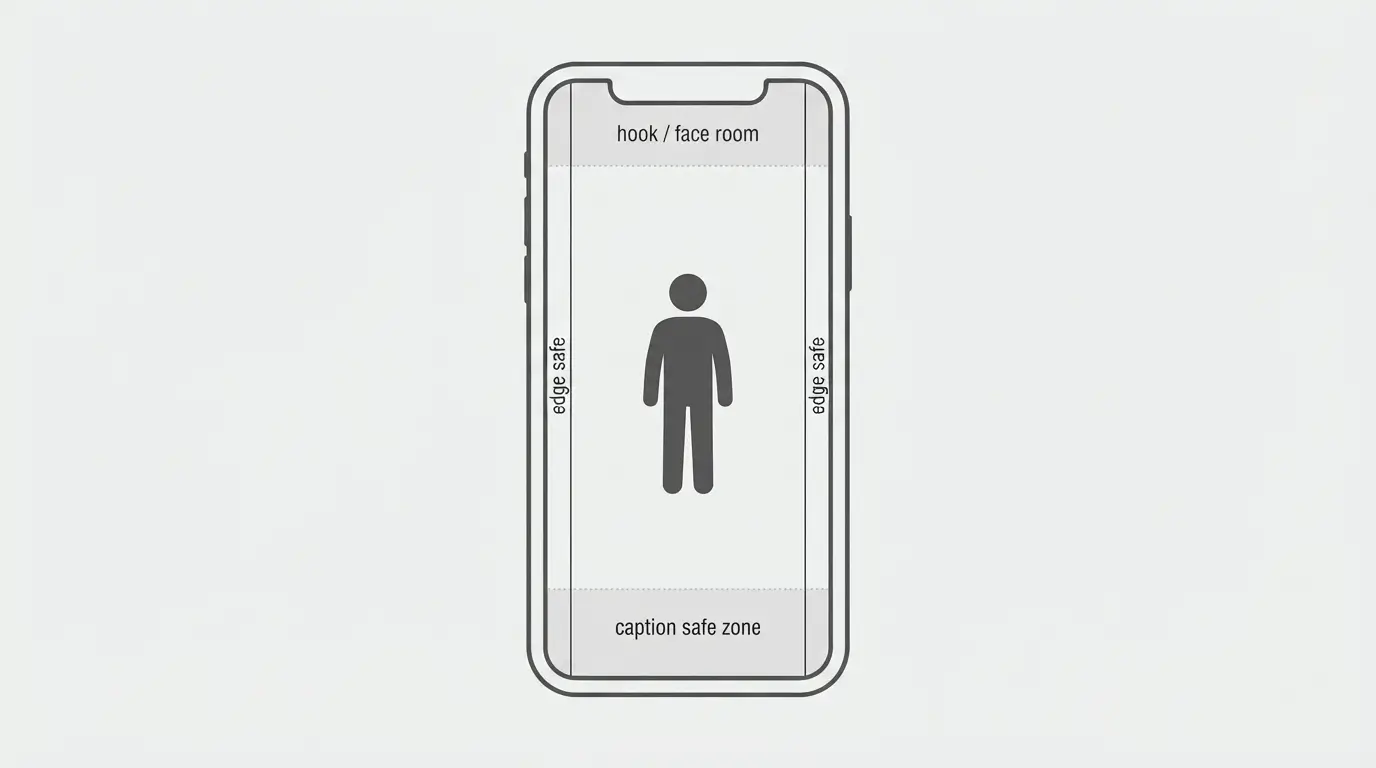
- Subject safe zone: Keep the hero (face, logo, product) in the center vertical third. UI chrome eats edges.
- Caption clearance: Leave roughly the bottom fifth quieter. Burned-in lower-third text will collide with TikTok/Shorts captions and buttons.
- First-second hook: If the interesting thing starts at second three, most viewers never see it. Put motion or the product in frame immediately.
- Skip wide establishing shots: Horizontal “hero landscape” compositions die on 9:16—you get sky and floor, not the subject.
- Side margins: Don’t park critical detail on the far left/right; feed UI and crop variance will trim it.
- Text in-prompt vs on-platform: Prefer platform captions over AI-rendered typography unless you’ve verified the glyphs stay sharp.
Quick publishing checklist
- Export 9:16, preferably 1080×1920 when the full model allows.
- Scrub on a phone: first frame, mid-clip, last frame—check crop and safe zones.
- Add captions/VO in the app if the clip is silent or native audio isn’t the final mix.
- Confirm sound: native audio or platform track, not both fighting.
- Cover/thumbnail frame: pick a mid-clip still where the subject is large and readable.
- Reuse the same vertical master for TikTok and Shorts; only re-edit if captions or length need platform-specific tweaks.
FAQ
What aspect ratio should I use for Seedance 2.0 TikTok clips?
Use 9:16 as the default. TikTok recommends vertical 9:16 for In-Feed creatives, and Google’s Shorts ads guidance treats 9:16 as the format best suited to Shorts.
How long should a Seedance 2.0 Shorts clip be?
Work inside Seedance’s common 4–15s output range. Use 4–6s for one beat, ~8–10s for hook + payoff, and 12–15s only when you have clear multi-beat structure.
Should I use Seedance 2.0 Fast or Mini for vertical drafts?
Yes for iteration. Fast and Mini are lighter draft variants; switch to full Seedance 2.0 (up to 1080p) once composition, motion, and prompt language are stable.
If you want to run these vertical AI video templates without juggling separate tools, you can try Seedance 2.0 on Movby.ai.